
Making an image link to another document is not difficult and would look something like this:
<a href="newpage.htm"><img src="image.gif"></a> We can also use a single image when we wish to link to a number of pages by dividing the image into different regions. This is called image mapping and can be done using any image.
The two main browsers Netscape and IE allow you to use two methods for creating image maps:
- server-side image maps
- client-side image maps
Server-side mapping is not generally used these days so we are going to concentrate on client-side mapping.
To make any type of image map you need to know the numeric pixel coordinates of the regions that you wish to use as the 'hot-spots' on your image. The easiest way to do this is to open your image with a graphics application e.g. Paint Shop Pro, Photoshop... and by using the selection tool you should easily be able work out the coordinates.
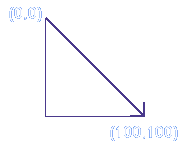
When selecting coordinates it is useful to remember that computer images work from top left to bottom right as shown in the diagram.
Using client-side image mapping means that we can incorporate the map in the HTML script rather than have it stored as a seperate program on the server. This allows the processing to be carried out quickly without the browser having to call upon the server every time you want to go to a different page.
Now instead of using the image tag as a link with the anchor tags around it, we place the image on the page and then refer to a map tag:
<img src="image.gif" usemap="#name" border=0> The usemap attribute can have any name you choose. If you did not set the border=0 a border the colour of your links would appear around the whole image.
Now we have to create our map using the <map> </map> tags. The following map would allow each of the three areas to be selected.
<img src="images/imagemap.gif" usemap="#index" border=0>
<map name="index">
<area shape="rect" coords="38,8,122,52" href="rect.htm">
<area shape="circle" coords="135,123,40" href="circle.htm">
<area shape="poly" coords="84,149,97,182,140,183,106,208,122,255,80,226,34,259,56,210,18,183,69,183" href="poly.htm">
</map>

© 1999 Nix Designs